Chord setup (Shift + Scales, held)
Buttons: Synth 1 · hold Shift, hold Scales, let go of Shift · pad 8 (Degrees) · pad 26 (strum Up) · pad 31 (slow) · captured with Scales still held
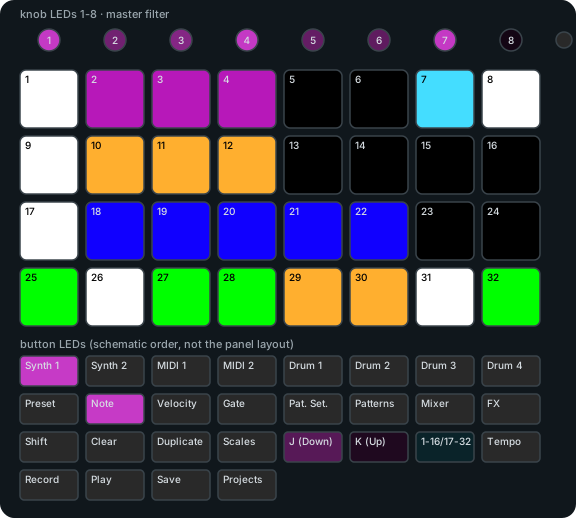
- 1-4 chord size 3 / 4 / 5 / 6 notes (chosen = white)
- 7-8 chord pads: Keys (stock layout) / Degrees (new)
- 9-12 inversion root / 1st / 2nd / 3rd
- 17-22 shape: triad, 7th, sus2, sus4, power, 6th
- 25-28 strum Off / Up / Down / Alternate (new)
- 29-31 strum speed 8 / 18 / 35 ms between notes (grey while Strum is Off)
- 32 Chord on/off: green = off (press to turn on), red = on
Arp setup (Shift + Preset, then Gate)
Buttons: Synth 1 · hold Shift, tap Preset, let go · tap Gate
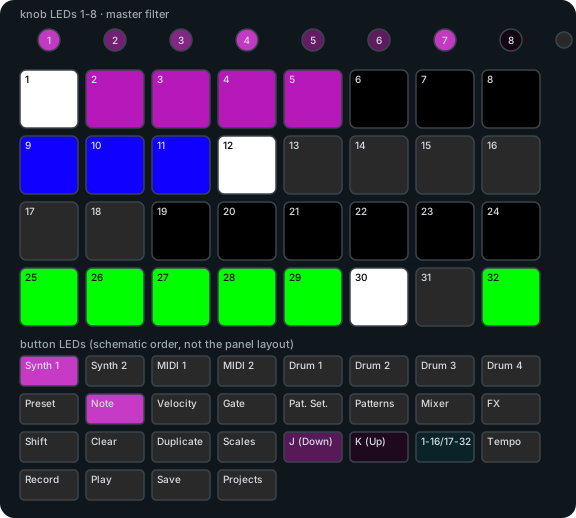
- 1-5 direction: up, down, up-down, random, as played
- 9-16 rate (meter; the chosen rate is white)
- 17 Latch (white = on, grey = off)
- 18 Chord: each held pad arpeggiates its chord
- 25-31 gate length (meter)
- 32 Arp on/off: green = off, red = on
Note view, Chord on, Degrees
Buttons: Synth 1 · hold Shift + Scales, let go of Shift · pad 8 (Degrees) · pad 32 (Chord on) · let go of Scales
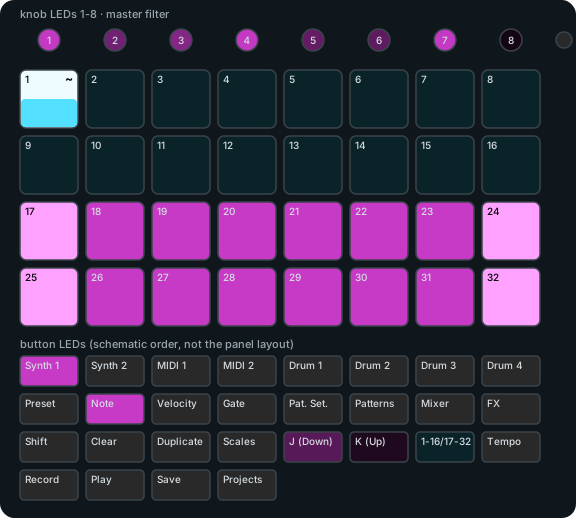
- 1-16 stock step pads (unchanged)
- 17-24 7th chords on I ii iii IV V vi vii° I′ (tonic pads in stock's root colour)
- 25-32 triads on I ii iii IV V vi vii° I′
Performance page (Mixer, then Mixer again)
Buttons: Synth 1 P2 given one note (so it is P1's fill) · Mixer · Mixer · pad 26 (Ramp) · pad 27 (Random)
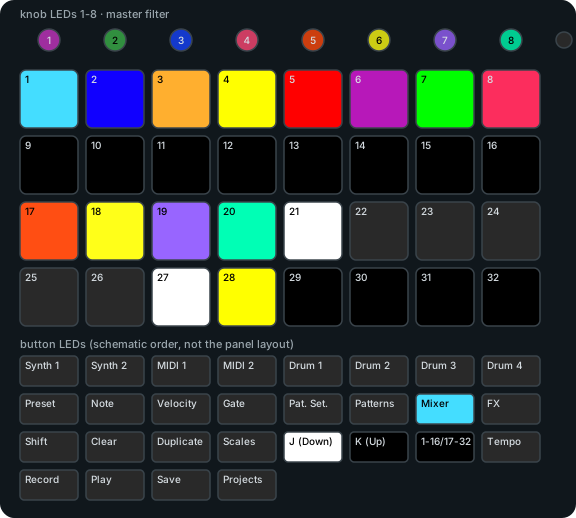
- 1 hold: delay throw (selected track's delay send to 110)
- 2 hold: reverb throw
- 3 hold: low-pass sweep of the master filter
- 4 hold: high-pass sweep
- 5 hold: FX cut (bypass)
- 6 hold: delay feedback lift (capped at 110)
- 7 hold: sidechain punch
- 8 hold: Fill (lit only when a track has a fill; here Synth 1 P2)
- 17-20 hold: roll Drum 1-4
- 21-24 roll division 1/8, 1/16, 1/32, 1/16T (dark in Ramp)
- 25-27 roll mode Fixed / Ramp / Random (chosen = white)
- 28 Reroll (Random only)
Pattern Settings with repeat pads
Buttons: Synth 1 · Pattern Settings · pad 27 (x3)
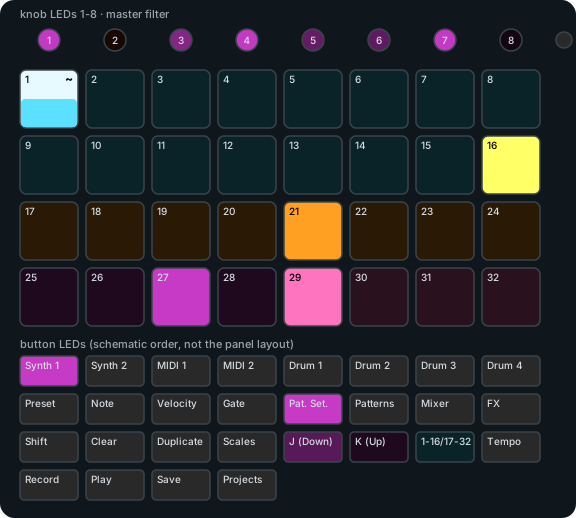
- 1-16 stock start/end of the pattern (unchanged)
- 17-24 stock sync rate (unchanged)
- 25-28 repeat x1-x4 (new; hold Shift for x5-x8). Count = bright track colour, others dim; white if the count is on the other half
- 29-32 stock playback direction (unchanged)
Custom FX page (FX, then pad 32)
Buttons: Synth 1 · FX · pad 32 · pad 6 (Hall) · pad 10 (Space echo) · pad 17 (Warm tape) · pad 25 (Juno I)
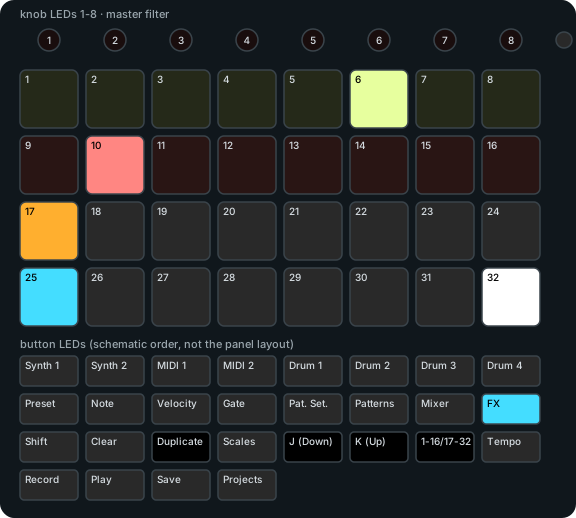
- 1-8 FDN reverb: Small room, Room, Studio, Chamber, Plate, Hall, Large hall, Cathedral
- 9-16 tape delay: Slapback, Space echo, Dub, Ping-pong, Wide tape, Long dark, Worn, Runaway
- 17-24 lo-fi for the selected track: Warm tape, Cassette, Worn tape, 12-bit, Old sampler, 8-bit, Radio, Dusty blend
- 25-31 chorus for the selected track: Juno I, Juno II, Juno I+II, Slow wide, Ensemble, Vibrato, Dark BBD
- 32 back to the stock FX page
XT Patterns matrix: chains and a queued pattern
Buttons: Shift + Synth 1 (X1) · Patterns · hold pad 1, tap pad 9 (chain X1 P1-P2) · Shift + Drum 2 (X6) · Patterns · hold pad 6, tap 14 and 22 (chain X6 P1-P3) · Play · after one beat tap pad 17 (X1 P3: queued)
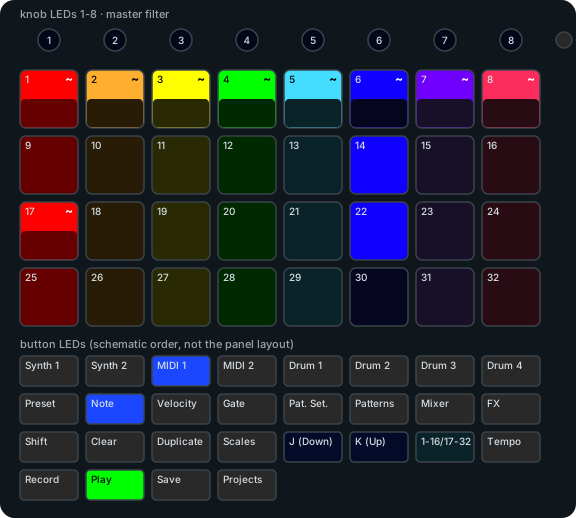
- here X6 plays a P1-P3 chain (bright, P1 pulsing); X1 plays P1 with P3 queued (flashing)
- columns lanes X1-X8, in lane colours
- rows patterns 1-4 of each lane
- bright in the lane's chain; the playing pattern pulses on the beat
- flashing queued: switches at the end of the lane's current pattern
- dim not in the chain
DX7 voice browser (double-tap Preset)
Buttons: release card (DX7/XT8 Starter.syx + PLUCK/) · Synth 1 · Note · Preset, Preset · pad 3 (load voice 3)
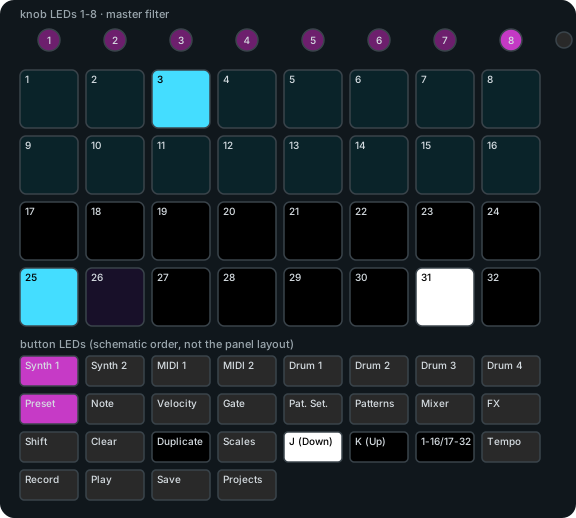
- 1-16 16 voices of this page: dim cyan = voice, bright cyan = loaded, amber = loading, red = failed; press the loaded one again for stock
- 17-24 one pad per 32 voices, current group white; dark here because the release card holds only 32 voices
- 25 DX7 tab
- 26 pluck tab
- 30-31 page up / down, lit when possible (here page 1 of 2: only down); Up/Down buttons too